If you bill for time, six minutes equals 0.1 hour—not 0.06 hour. Use the free invoice generator to show decimal hours and the agreed hourly rate clearly, but first decide whether your client is paying for actual minutes or rounded billing increments. That choice changes the invoice total.
This guide explains the arithmetic for freelancers and consultants. It is not a rule that everyone must bill in six-minute blocks. Use the billing method your client has agreed to, and check any professional or contractual requirements that apply to your work.
What a 6-minute billing increment means
An hour contains 60 minutes. Dividing it into ten equal parts gives six minutes per part. Each part is one tenth of an hour, written as 0.1.
If your agreement says to round each time entry up to the next six-minute block, a seven-minute task becomes 12 billed minutes, or 0.2 hours. A task lasting exactly six minutes stays at 0.1 hours. Zero minutes should stay zero, not become a minimum charge by accident.
Common conversions under this specific round-up method are:
- 1–6 actual minutes: 0.1 billed hours.
- 7–12 minutes: 0.2 hours.
- 13–18 minutes: 0.3 hours.
- 19–24 minutes: 0.4 hours.
- 25–30 minutes: 0.5 hours.
- 55–60 minutes: 1.0 hour.
This chart describes rounding up, not rounding to the nearest block. Those are different methods. A client who agreed to actual minutes has not automatically agreed to either one.
Actual time and decimal hours are different from rounding
Converting minutes to decimal hours does not require rounding the time itself. The conversion is:
Decimal hours = whole hours + minutes divided by 60.
For example, one hour and 20 minutes is 1 + 20 ÷ 60 = 1.333333… hours. At $90 per hour, that is $120 before any applicable tax. Entering 1.20 hours instead would produce $108, an undercharge of $12.
Keep the original time record even if the invoice displays fewer decimal places. Multiplying a prematurely rounded quantity can change the charge. If you show 1.33 hours but charge from exactly 80 minutes, explain the basis or include the actual duration in the description so the displayed numbers do not look inconsistent.
Worked example: three tasks at $120 per hour
Suppose a consultant records three separate tasks for one client:
- Review a brief: 7 minutes.
- Discuss changes: 13 minutes.
- Update the document: 22 minutes.
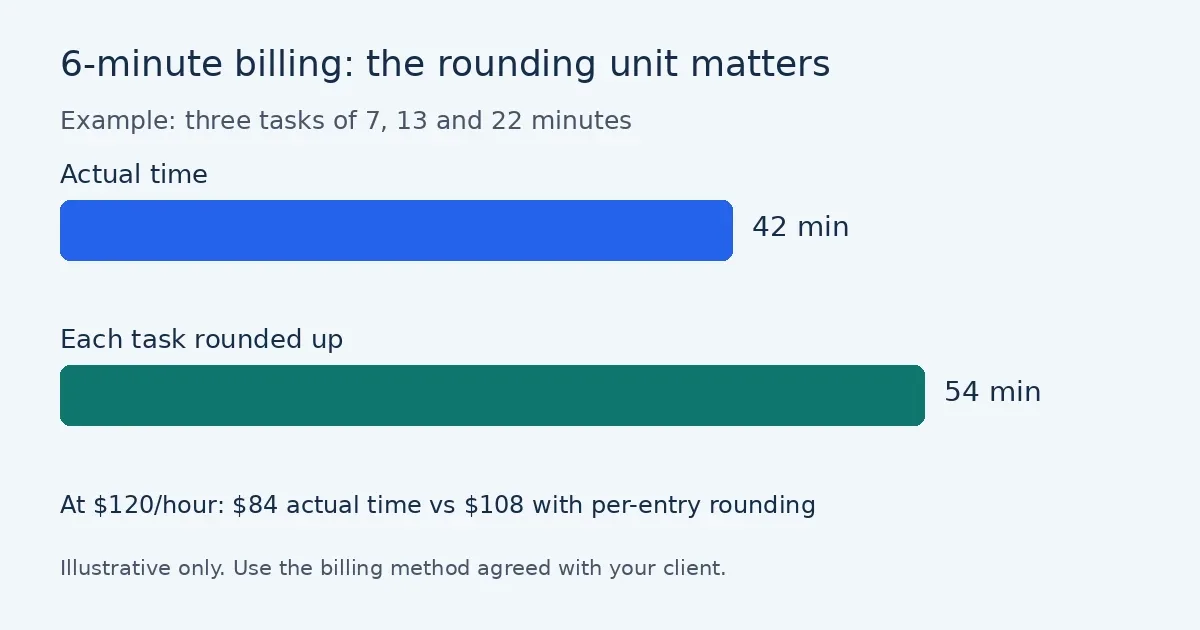
The actual time is 42 minutes, or 0.7 hours. Without billing increments, the charge is 0.7 × $120 = $84.
Under an agreed policy of rounding each entry up to six minutes:
- The 7-minute review becomes 12 minutes: 0.2 × $120 = $24.
- The 13-minute discussion becomes 18 minutes: 0.3 × $120 = $36.
- The 22-minute update becomes 24 minutes: 0.4 × $120 = $48.
The invoice subtotal is $108 for 0.9 billed hours. The rounding adds 12 minutes and $24 compared with actual-time billing. That difference is why the rounding policy belongs in the agreement, not as a surprise on the final invoice.
Round each entry or round the total?
These methods can produce different answers even with the same work records. In the example, rounding each task produces 54 billed minutes. Adding the actual minutes first gives 42 minutes, already a multiple of six, so rounding that combined total produces just 42 billed minutes.
Choose one unit of rounding: each task, a daily total or the whole billing period. Document it and apply it consistently. Do not round individual tasks and then add another minimum to the total unless that separate charge was clearly agreed.
A useful scope note is: “Time billed at $120 per hour; each separate task rounded up to the next six-minute increment. Actual time records available with the invoice.” Adapt that wording to what you genuinely agreed; it is an example, not a legal clause.
Build the timesheet before the invoice
The timesheet-to-invoice tool lets you enter dates, start and end times, breaks, an hourly rate and an optional rounding rule. Its six-minute option rounds each entry up, so the entries you create determine the result. Do not enter a whole day if your agreement requires separate task-level rounding, or split a single task merely to increase the bill.
- Record actual start and end times while the details are fresh.
- Subtract unpaid breaks and keep non-billable admin separate.
- Select no rounding or the increment you actually agreed.
- Review each entry and the total before creating invoice lines.
- Keep the original timesheet with your invoice records.
If you are still choosing a sustainable price, the freelance hourly rate calculator helps account for costs and non-billable time. Setting the rate and measuring the hours are separate decisions.
What the client should see
Use descriptions that identify the work, its date or period, the billed quantity and the rate. For the example, a clear line is: “Brief review — 7 actual minutes, billed as 0.2 hours under agreed 6-minute increments” with quantity 0.2 and rate $120.
You can instead use one line for 0.9 hours and attach the itemised timesheet if the client accepts that format. Avoid a vague description such as “Consulting: $108” when the buyer expects evidence of time.
The $108 example is a subtotal, not a statement about tax. For US billing, check the guide to sales tax on invoices and the relevant state rules before deciding whether tax applies. Rounding hours does not determine tax treatment.
Common questions
Does 0.6 hours mean six minutes?
No. It means 36 minutes: 0.6 × 60. Six minutes is 0.1 hour.
Must I round every short email to six minutes?
Not automatically. Follow the agreed billing method and any applicable professional rules. Do not turn non-billable activity into billable work simply because a calculator can round it.
Can I use 15-minute increments instead?
If appropriate for your agreement, yes. Fifteen minutes equals 0.25 hours. Larger increments can create larger differences between actual and billed time, especially when applied to many small entries, so make the effect clear before work starts.
Should I change old invoices to a new rounding method?
Do not silently apply a new policy to completed work. Agree any change for future billing and retain the records supporting past charges. Resolve a disputed invoice against the terms that actually applied.
Related tools
- Compare freelance day rates
- Calculate the invoice payment deadline
- Create a quote with the billing method stated
This article is general information, not tax, accounting or legal advice. Check your agreement and the rules that apply to your work before billing a client.